What Does AI Native Mean in Home Health?
AI native means that artificial intelligence is foundational to how a product, platform, or workflow is designed and operates, rather than being added later as an isolated feature.
That distinction matters because almost every healthcare technology company now has an AI story.
- An EHR may have an AI scribe.
- A referral platform may have an AI summarizer.
- A billing system may have AI coding assistance.
- A scheduling platform may have predictive scheduling.
All of these can be useful. But adding AI to an existing product does not automatically make that product AI native.
IBM defines AI native as a product, company, or workflow designed from the ground up with AI as a core component rather than having AI bolted on later. It also notes that AI-native systems can shape architecture, decision-making, user experience, and the broader system lifecycle.
For home health, the distinction is particularly important because care does not happen inside one application.
It happens across:
- Nurses.
- Therapists.
- Home health aides.
- Intake teams.
- Schedulers.
- QA teams.
- Physicians.
- Patients.
- Family caregivers.
- Referral sources.
- Payers.
- EMRs.
- Documentation systems.
- Billing workflows.
An AI-native approach asks a fundamentally different question:
What would home health workflows look like if AI were available from the beginning?
What Is the Difference Between AI-Enabled, AI-Driven, and AI Native?
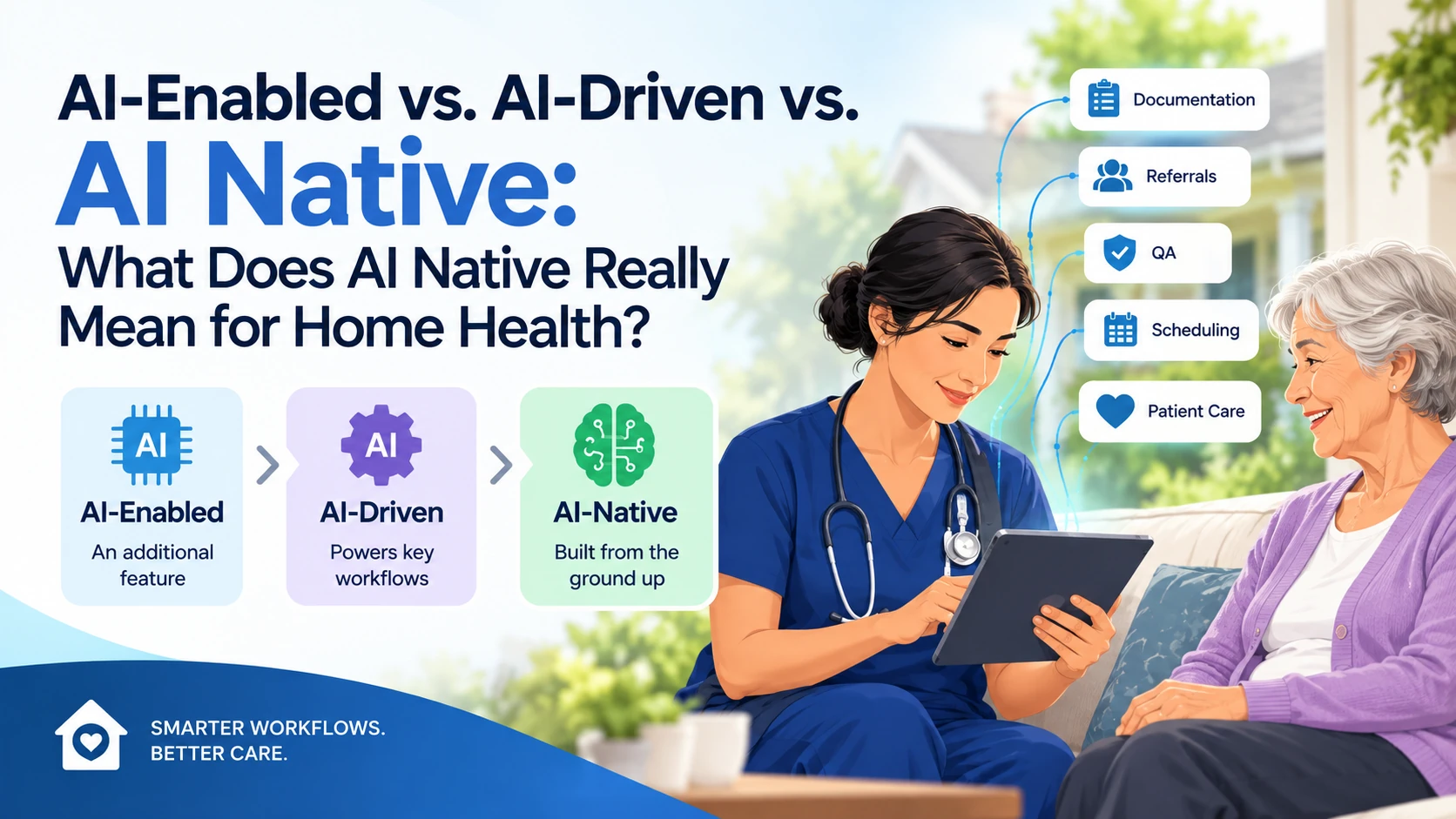
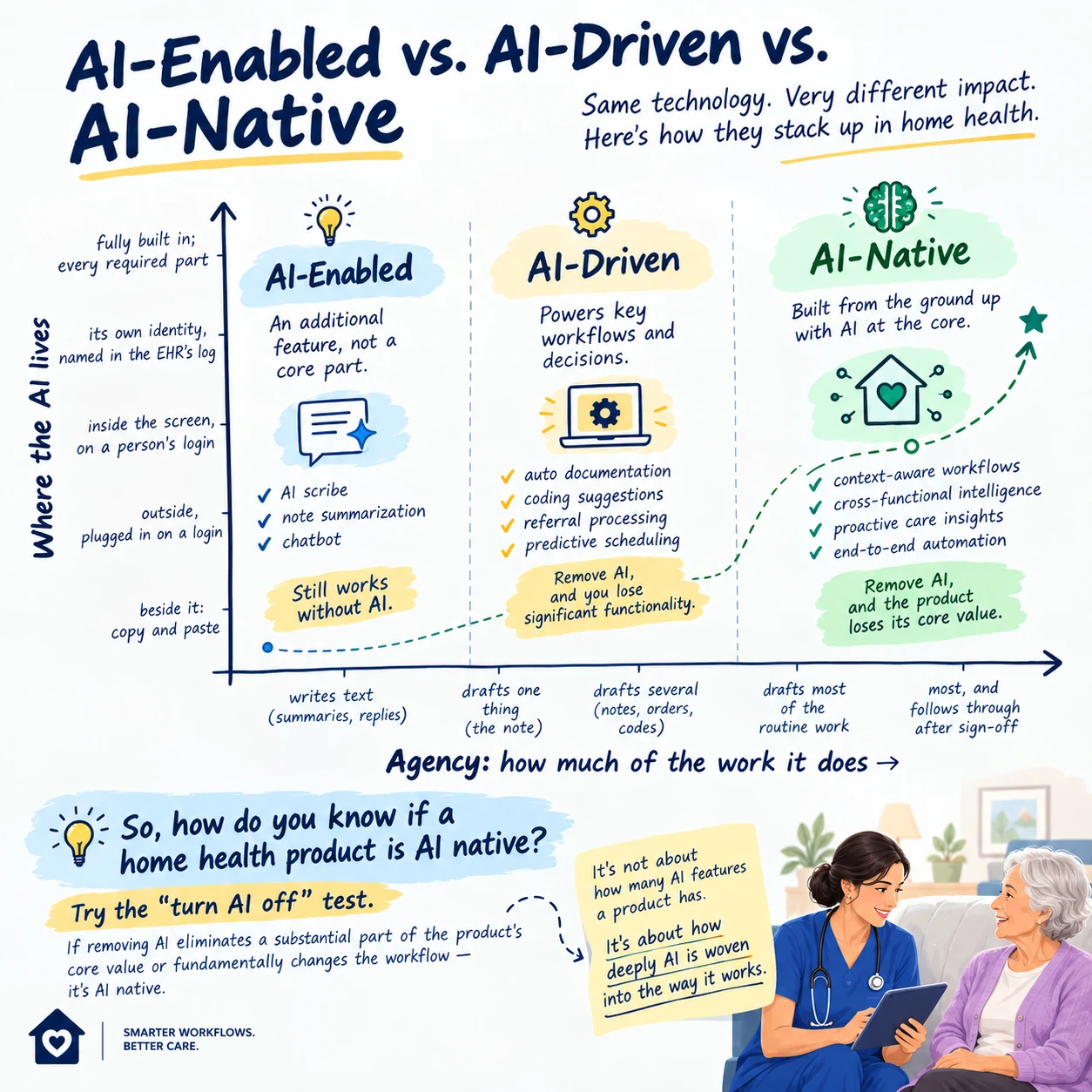
The terms are not universally standardized, so they can overlap in vendor marketing. A useful working distinction is:
| Approach | Role of AI | Typical Example | What Happens if AI Is Removed? |
|---|---|---|---|
| AI-enabled | AI is an additional feature | Note transcription or chatbot | Core software still works |
| AI-driven | AI powers several important workflows | Automated documentation, coding suggestions, referral processing | Significant functionality is lost |
| AI-native | AI is foundational to the product architecture and workflow | Context-aware, intelligent workflow orchestration across multiple functions | The product loses much of its core value |
The important distinction is not how many AI features a platform has. It is whether AI is fundamentally part of how the product gathers information, interprets context, makes recommendations, coordinates work, and adapts the workflow.
What Is the Simplest Test for Whether a Home Health Product Is AI Native?
Try the “turn AI off” test. Ask: If we turn the AI off, does the product still fundamentally work the same way?
If yes, the AI may be an add-on or enhancement.
If removing AI eliminates a substantial part of the product's core value or fundamentally changes how the workflow operates, that is stronger evidence that AI is native to the system.
This is not a formal certification test, but it is a useful way to cut through marketing language.
IBM makes a similar distinction: in an AI-native product, AI cannot simply be a removable component without fundamentally affecting the product's usefulness.
Does Having an AI Scribe Make Home Health Software AI Native?
No. An AI scribe can be valuable without making the underlying platform AI native.
Consider:
Visit → Nurse documents → AI generates note → Nurse reviews
The AI is performing an important task. But the overall workflow still exists independently of the AI.
Now consider a system where:
Visit → Information is captured → AI understands context → Documentation is structured → Missing information is identified → Relevant downstream tasks are prepared → Exceptions are routed → Clinician reviews and approves
The AI is no longer just generating a document. It is participating in the workflow. That is much closer to an AI-native model.
Why Is the “AI Scribe” Example Important for Home Health?
Because documentation is only one part of home health work. A nurse doesn't simply create a note. The documentation connects to:
- The patient's clinical history.
- The plan of care.
- Orders.
- OASIS.
- QA.
- Billing.
- Compliance.
- Care coordination.
- Future visits.
- Potential payer review.
If AI only produces a better note, it may improve one step. If AI understands how that information affects the rest of the workflow, the opportunity becomes much larger.
The question changes from: “Can AI write the note?” to: “What work should happen because the note now exists?”
What Does AI Native Mean Architecturally?
AI-native architecture is not simply “old software plus an AI API.”
The underlying system needs to support AI as a core part of how the application operates.
Depending on the product, this can involve:
- AI orchestration.
- Structured and unstructured data.
- Context management.
- Model routing.
- Tool use.
- Agent workflows.
- Real-time or event-driven processing.
- Permissions.
- Audit trails.
- Feedback loops.
- Evaluation systems.
- Monitoring.
- Human intervention.
The exact architecture will vary. A home health AI platform does not need to check every box to qualify as AI native. The larger point is that AI has to be considered at the architecture and workflow level, not simply at the feature level.
Does AI Native Require Real-Time Data?
Not necessarily. Real-time information can be valuable for many home health workflows, particularly when information changes quickly.
Examples could include:
- Scheduling.
- Visit status.
- Patient-reported information.
- Remote monitoring.
- Referral updates.
- Exceptions.
- Care coordination.
But real-time streaming is not what defines AI native. The defining characteristic is that AI is foundational to the product and workflow. Real-time data is an architectural capability that can make some AI-native workflows more useful.
Does AI Native Require Continuous Learning?
Not necessarily. This is another distinction worth making.
An AI-native product can use models that are continuously updated, periodically retrained, externally provided, or otherwise governed.
Continuous learning is a possible capability, not a universal requirement.
In healthcare, blindly allowing a system to continuously change its behavior can actually create significant governance concerns.
A better approach is controlled improvement:
Data → Evaluation → Human review → Model/workflow improvement → Validation → Deployment → Monitoring
The objective is not for the AI to change itself without oversight. The objective is to create a system that can improve systematically and safely.
Why Does AI Native Need to Be Designed for Uncertainty?
Traditional software generally works through deterministic logic. For example: If X happens → do Y.
AI systems introduce probabilistic outputs. The system may be highly confident. It may be uncertain. It may encounter information it does not understand. It may produce an incorrect answer.
That means an AI-native home health system needs to be designed around uncertainty rather than pretending uncertainty does not exist.
For example:
- High confidence → proceed within authorized workflow.
- Low confidence → request clarification.
- Potential clinical risk → escalate.
- Conflicting information → flag for human review.
This is particularly important in healthcare.
Does AI Native Mean AI Makes Clinical Decisions Autonomously?
No. AI-native does not mean human-free. A system can be deeply AI native while keeping clinicians in control of clinical decisions. In fact, healthcare is one of the environments where the distinction between automation and autonomy matters most.
AI can potentially:
- Organize information.
- Identify patterns.
- Draft documentation.
- Recommend next steps.
- Flag exceptions.
- Route tasks.
- Retrieve information.
- Perform authorized administrative actions.
But the appropriate level of human involvement depends on the task and its risk.
A useful model is:
- Automate low-risk repetitive work.
- Assist with judgment-heavy work.
- Escalate uncertain or high-risk situations.
- Keep accountable professionals in control of consequential decisions.
Can AI Agents Be Part of an AI-Native Home Health Platform?
Yes. AI agents can be particularly relevant to AI-native workflows because they can move beyond generating content and perform sequences of authorized tasks.
For example, an agent could potentially:
- Receive a referral.
- Read the documents.
- Extract relevant information.
- Identify missing information.
- Create a task.
- Contact or route the request to the appropriate team.
- Track the outstanding item.
- Escalate if it remains unresolved.
The important distinction is that the agent is not merely answering a question. It is participating in a workflow. However, healthcare agents need defined permissions, escalation rules, monitoring, and auditability.
What Does AI Native Mean for Home Health Referral Intake?
Referral intake is one of the clearest examples.
A traditional process may look like:
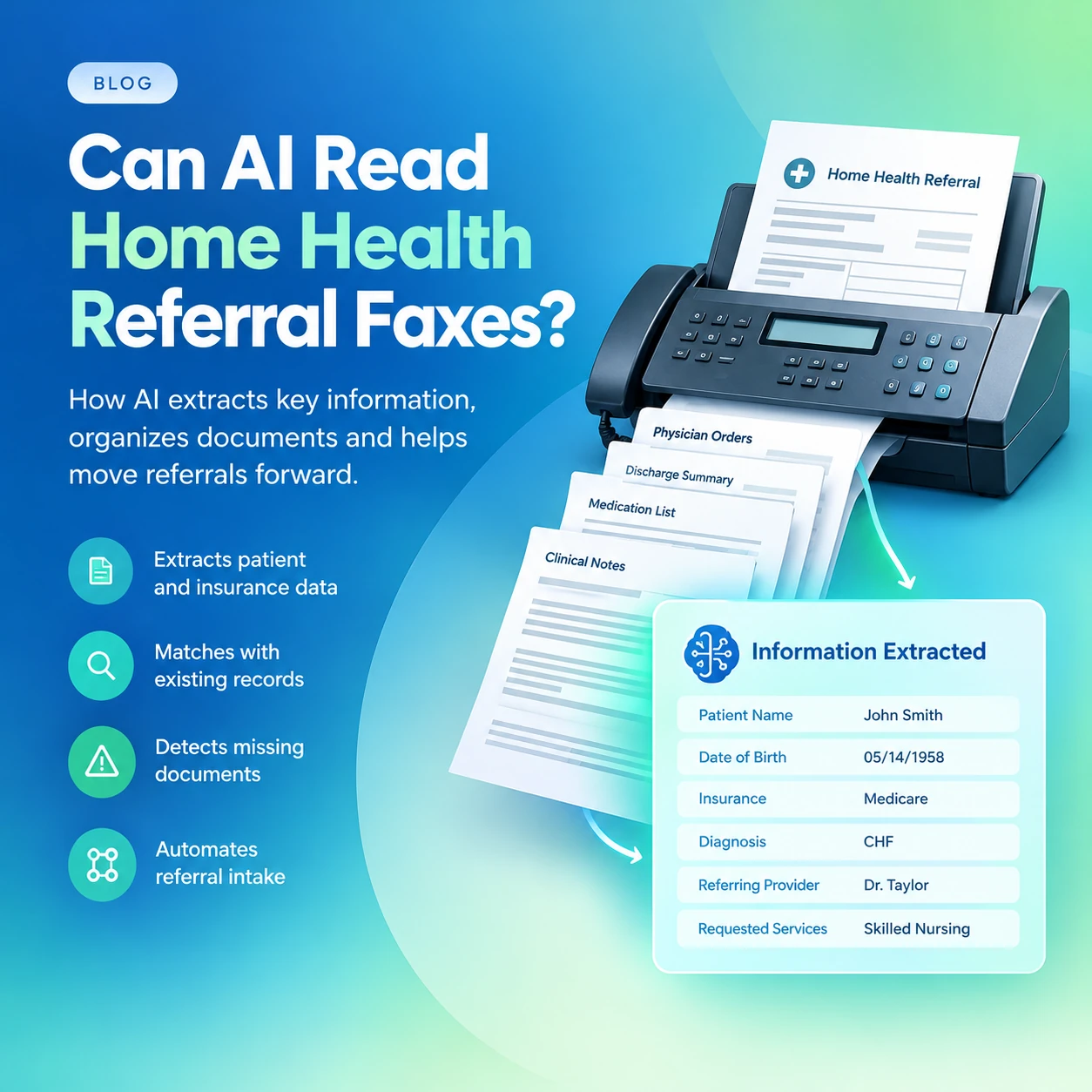
Fax → Open documents → Read pages → Find information → Enter data → Identify missing information → Call referral source → Follow up
AI-enabled software might summarize the referral. AI-driven software might extract information and identify missing pieces. An AI-native workflow could potentially treat the referral itself as the beginning of an intelligent workflow.
The system could:
- Understand different document formats.
- Extract patient information.
- Identify diagnoses and requested services.
- Recognize missing information.
- Prioritize referrals.
- Create follow-up tasks.
- Track outstanding information.
- Route exceptions.
- Prepare downstream workflows.
The difference is that AI isn't simply reading the referral. It is helping move the referral through the organization.
What Does AI Native Mean for Home Health Documentation?
AI-native documentation can move beyond transcription.
A traditional workflow is:
Capture → Type → Review → Submit
An AI-native workflow could be:
Capture → Understand → Structure → Check → Prepare → Review → Approve → Trigger next steps
That means documentation becomes an active part of the workflow rather than a dead-end record.
For example, once information is captured, the system could potentially identify:
- Missing information.
- Contradictions.
- Follow-up needs.
- Documentation requirements.
- Potential QA issues.
The clinician still reviews the output. The AI simply does more of the repetitive information work around the clinician.
What Does AI Native Mean for OASIS?
OASIS provides another useful example. An AI-enabled tool might help draft documentation. An AI-driven tool could help identify missing or inconsistent information. An AI-native workflow could integrate OASIS-related information into the broader clinical documentation and QA process.
Potential uses could include:
- Surfacing relevant information from the record.
- Organizing visit information.
- Identifying potentially incomplete responses.
- Flagging inconsistencies.
- Supporting QA.
- Reducing repetitive data entry.
- Helping clinicians find relevant information faster.
But there is an important boundary: AI should not be treated as an autonomous substitute for the clinician's assessment. The clinician should validate the information and remain responsible for the final assessment.
What Does AI Native Mean for Home Health QA?
Traditional QA often happens after documentation is completed. An AI-native approach can potentially move QA closer to the point where the work happens.
Instead of:
Document → Submit → QA finds problem
the workflow can become:
Document → AI identifies potential issue → Clinician reviews → Correct → Submit
This can make QA more proactive.
AI could potentially look for:
- Missing information.
- Contradictory documentation.
- Inconsistent responses.
- Missing signatures.
- Unresolved exceptions.
- Documentation that doesn't align across records.
The AI does not make the final compliance determination. It helps the QA team find where attention is needed.
Why Is Unified Context Important for AI Native Home Health?
One of the biggest differences between a point AI feature and a broader AI-native system is context.
Home health information can be distributed across:
- Referral documents.
- EMRs.
- OASIS.
- Visit notes.
- Scheduling.
- Orders.
- Medication information.
- Patient communications.
- Caregiver information.
- Remote monitoring.
- Billing.
- QA.
If AI only sees one document at a time, its understanding is limited. An AI-native system aims to provide the AI with the appropriate context and permissions needed to perform a workflow. That does not mean giving the AI unlimited access to everything. It means making relevant information available within appropriate governance boundaries.
Does AI Native Mean All Home Health Data Should Be in One Database?
No. Unified context does not necessarily mean one physical database. Healthcare organizations will continue to use multiple systems. The more important question is: Can the AI access the right information across those systems, when authorized, in a way that preserves context and accountability?
Integration, interoperability, APIs, event-driven systems, data layers, and orchestration can all contribute to that.
The goal is not necessarily one database. The goal is one coherent workflow.
What Is the Difference Between a Data Integration and AI-Native Context?
A data integration moves information. AI-native context helps the system understand how that information relates to the task it is performing. For example: An integration might send a patient's referral into another system.
An AI-native workflow could potentially understand:
- Why the patient was referred.
- What services were requested.
- What information is missing.
- Which team should act.
- What needs to happen next.
That is a significant difference. Integration moves data. Intelligence uses context.
Can AI Native Make the Home Health User Interface Less Important?
Potentially, yes. Traditional healthcare software often requires users to navigate: Screen → Menu → Form → Field → Button → Next screen
AI-native experiences can increasingly allow users to express intent naturally.
For example:
- “Show me the referrals waiting on missing orders.”.
- “Which patients have incomplete documentation?”.
- “Find the notes that need QA review.”.
The system can potentially determine the required workflow instead of forcing the user to manually navigate through every step. But healthcare interfaces will still need structured controls, visibility, and auditability. Natural language should complement traditional interfaces, not necessarily replace them.
Can AI Native Adapt the Workflow to Each Patient?
Potentially. This is one of the more interesting differences between traditional software and AI-native systems.
A traditional workflow often looks like:
Patient → Standard pathway
An AI-native workflow could potentially become:
Patient + context + current state → Appropriate workflow
For example, different information or exceptions could trigger different next steps. However, adaptive workflows need strong governance. The system should not simply change care pathways because a model generated a different recommendation.
There must be defined boundaries around:
- What AI can change.
- What requires approval.
- What requires escalation.
- What must remain fixed.
- What actions are prohibited.
Why Does AI Native Matter for the Home Health Workforce?
Home health staff spend significant time on work that is necessary but not necessarily clinical.
That includes:
- Documentation.
- Data entry.
- Searching records.
- Referral processing.
- Follow-ups.
- Coordination.
- Status checks.
- QA preparation.
AI-native workflows could potentially absorb more of these administrative activities. That creates a different opportunity than simply making documentation faster. The objective becomes: Remove work, not just make existing work slightly faster. This is an important distinction for home health.
Can AI Native Reduce the Number of Systems Home Health Staff Have to Use?
Potentially. One of the problems with healthcare technology is that every new capability can become another application. That creates: System A → System B → Copy → Paste → System C → Log in → Reconcile
An AI-native architecture can potentially act as an orchestration layer across existing systems. The goal should not be to create another destination for staff. It should be to make the systems they already use easier to operate.
Does AI Native Mean Replacing the EMR?
No. AI native and EMR replacement are separate questions.
An AI-native platform can potentially work:
- Inside an existing EMR.
- Alongside an EMR.
- Through integrations with multiple systems.
- As an orchestration layer across systems.
The more important question is: Does the AI reduce workflow friction without creating another silo? Healthcare organizations already have significant investments in systems of record. AI should not automatically require rebuilding everything.
What Does AI Native Mean for Care Coordination?
Care coordination is inherently context-heavy.
A patient may have:
- Multiple clinicians.
- Multiple appointments.
- Multiple diagnoses.
- Family caregivers.
- Changing needs.
- Multiple organizations involved.
An AI-native workflow could potentially help maintain continuity across those moving pieces.
For example, AI could identify that information from one part of the workflow requires action somewhere else.
That could mean:
- Observation → Task.
- Change → Notification.
- Missing information → Follow-up.
- Exception → Escalation.
Again, the system should operate within defined permissions.
Can AI Native Support Patient Monitoring Between Home Health Visits?
Potentially.
An AI-native system could potentially combine information from:
- Patient-reported symptoms.
- Caregiver input.
- Remote monitoring.
- Recent visits.
- Medication information.
- Communication history.
It could then identify potential exceptions that require human attention. But this should not be interpreted as autonomous clinical monitoring. A safer model is: AI detects → AI prioritizes → Human evaluates → Appropriate action AI should not be positioned as a replacement for emergency services, clinical assessment, or professional judgment.
How Does AI Native Handle Exceptions?
This is one of the most important questions. A weak AI workflow assumes: Everything is predictable. A mature AI-native workflow assumes: Something will eventually go wrong.
Patients change. Referrals arrive incomplete. Systems go offline. Information conflicts. AI becomes uncertain. A good AI-native architecture therefore needs explicit exception handling.
For example:
- Normal case → AI handles.
- Uncertain case → AI asks.
- Complex case → Human reviews.
- High-risk case → Escalate.
- System failure → Fallback workflow.
This is especially important in healthcare.
Does AI Native Mean the AI Should Learn From Every Patient Interaction?
Not automatically. Healthcare data requires strong privacy, security, governance, and access controls. A system should not casually treat every patient interaction as training data.
Instead, organizations need clearly defined policies around:
- Data use.
- Model improvement.
- Privacy.
- Retention.
- Access.
- De-identification where appropriate.
- Auditability.
- Vendor responsibilities.
AI-native does not mean “everything becomes training data.”
What Governance Does an AI-Native Home Health Platform Need?
The more operational responsibility AI receives, the more important governance becomes.
An AI-native home health system should have clear controls around:
- User permissions.
- AI permissions.
- Human approval.
- Escalation.
- Audit trails.
- Data access.
- Model monitoring.
- Error handling.
- Security.
- Privacy.
- Change management.
The central question should be: Who is allowed to do what, under what conditions, and how can we prove what happened?
How Important Is Auditability in AI Native Healthcare?
Extremely important. If an AI system performs or recommends an action, healthcare organizations need visibility into the workflow.
Depending on the application, that may include:
- What information the AI used.
- What the AI generated.
- What action it recommended.
- What action it actually took.
- Who reviewed it.
- What the reviewer changed.
- When the action occurred.
An AI-native healthcare system should not become a black box simply because it is intelligent.
Can an AI-Native System Still Use Rules?
Absolutely. AI-native does not mean abandoning deterministic logic. Healthcare workflows often require both.
For example:
- Rules: A required field cannot be empty.
- AI: Interpret a complex narrative and identify potentially relevant information.
- Rules: A particular action requires human approval.
- AI: Prepare the information needed for that action.
The strongest systems can combine: Rules + AI + workflow orchestration + human judgment.
Is AI Native Always Better Than AI Enabled?
No. AI native is an architectural approach, not a guarantee of better outcomes.
An AI-native system can still have:
- Poor models.
- Bad workflows.
- Weak integrations.
- Poor usability.
- Inaccurate outputs.
- Security problems.
- Weak governance.
Meanwhile, an AI-enabled tool can solve a very specific problem extremely well. A home health agency should therefore evaluate the outcome, not the label.
How Can a Home Health Agency Tell if “AI Native” Is Just Marketing?
Ask vendors questions that require operational answers.
- What happens if the AI is disabled?
- Which workflows were redesigned around AI?
- What can the AI actually execute?
- What systems can it interact with?
- What data can it access?
- What permissions does it have?
- What happens when it is uncertain?
- Can a human override it?
- Is every AI action auditable?
- How do you measure AI errors?
- How do you evaluate model changes?
- What happens when an integration fails?
- Does the AI reduce work or simply move work to another screen?
That last question is particularly important.
What Is the “Work Removal” Test for AI in Home Health?
Instead of asking: “How much time does AI save on this task?” ask: “Does this task still need to exist in the same form?”
That is a much more powerful question.
For example:
AI-enabled:
Nurse writes note → AI makes it faster
AI-native:
AI structures information → nurse reviews the clinically relevant output
The second approach may remove steps rather than simply accelerating them. This is where AI-native design can become more than automation. It can become workflow redesign.
What Is the Difference Between AI Automation and AI-Native Workflow Design?
Automation usually asks: “Can we automate this step?” AI-native design asks: “Should this step exist at all?” That distinction matters.
If an organization automates a bad process, it may simply create a faster bad process. AI-native design gives the organization an opportunity to reconsider the process itself.
For home health:
Old workflow → automate each step
versus
AI-native workflow → redesign the sequence around what humans and AI are each best at
That is a much larger opportunity.
What Does AI Native Mean for the Future of Home Health?
The long-term opportunity is not simply more AI features. It is a shift from software that records work toward software that participates in work.
That could mean:
- Referral → AI understands → Missing information identified → Follow-up initiated.
- Visit → Information captured → Documentation structured → Gaps identified → Clinician approves.
- Record → AI monitors for exceptions → Human reviews.
- QA → AI identifies potential issues → Reviewer focuses on exceptions.
- Patient interaction → AI handles permitted routine tasks → Clinical issues escalate to humans.
The common thread is that AI becomes part of the workflow itself.
What Is the Biggest Difference Between AI-Enabled and AI Native Home Health?
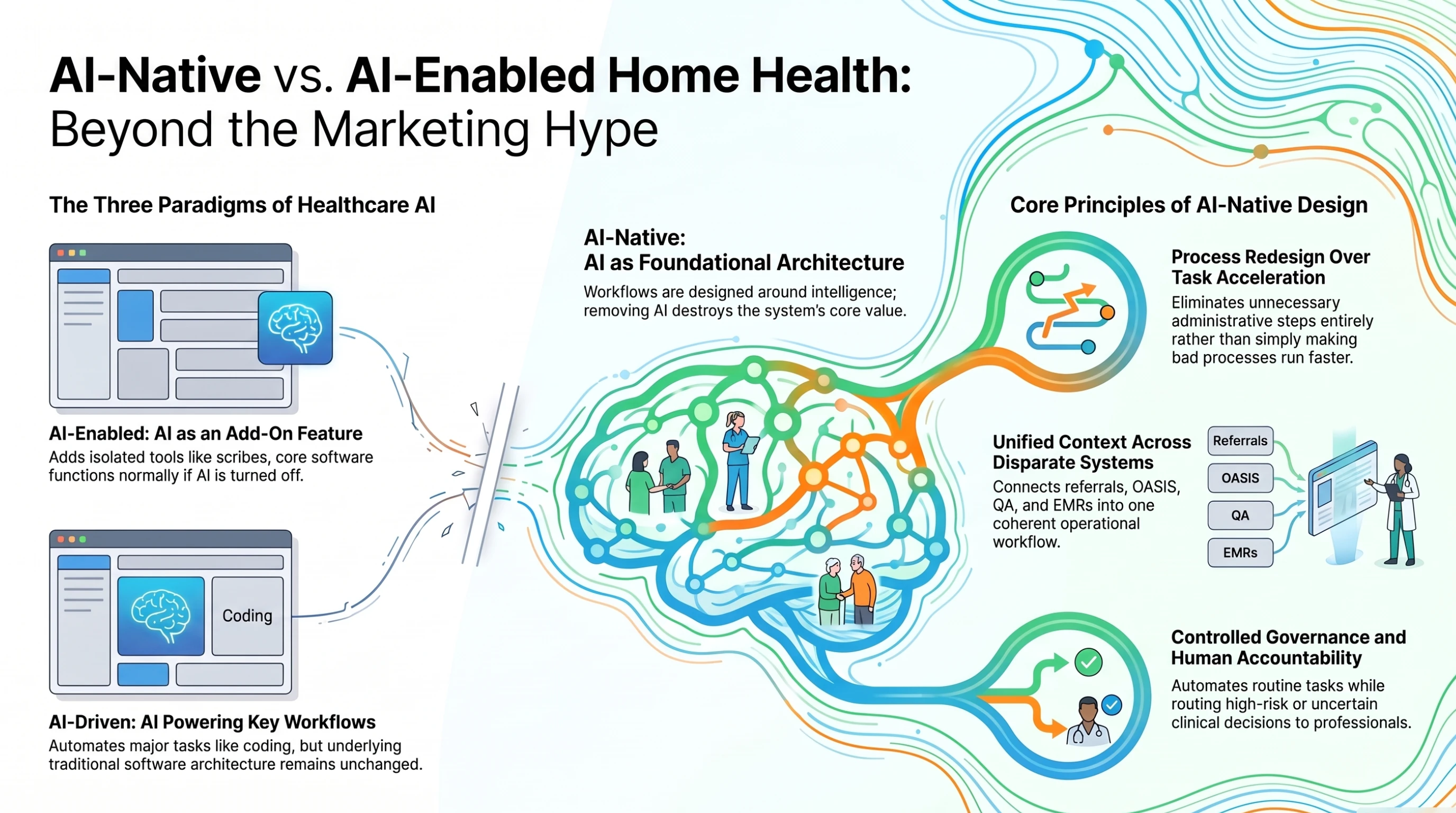
It comes down to one question: Is AI a feature inside the workflow, or is the workflow designed around AI?
AI Enabled
AI helps the existing workflow.
AI Driven
AI powers multiple parts of the workflow.
AI Native
The workflow, architecture, experience, and operating model are designed around AI from the foundation.
That does not mean humans disappear. It means the division of labor changes. AI handles more of the repetitive, information-heavy, coordination-heavy work. Humans retain judgment, accountability, empathy, relationships, and responsibility.
What Should Home Health Leaders Ask Before Buying AI-Native Software?
A practical evaluation checklist is:
| Question | What to Look For |
|---|---|
| What happens if AI is turned off? | Does the product fundamentally depend on AI? |
| What work did AI eliminate? | Actual workflow reduction, not just faster typing |
| Where does AI operate? | One feature or across connected workflows? |
| What context can AI access? | Relevant, authorized information across systems |
| Can AI take action? | Clearly defined, permission-based actions |
| What happens when AI is uncertain? | Escalation and human review |
| Can humans override AI? | Clear intervention mechanisms |
| Is every action auditable? | Complete activity and approval history |
| How are models evaluated? | Ongoing quality and safety monitoring |
| Does it integrate with existing systems? | Minimal new silos and duplicate work |
| Does it support healthcare governance? | Privacy, security, permissions, and controls |
| What outcome improves? | Documentation time, turnaround, exceptions, quality, workload, etc. |
What Is the Biggest Misconception About AI Native in Home Health?
The biggest misconception is that AI native means more automation. It doesn't. It means AI is foundational to how the system works. A badly designed AI-native product can automate the wrong things. A good AI-native product should make the work itself simpler.
The goal should not be: “Let's put AI everywhere.” It should be: “Let's rethink where humans add the most value, where AI can reliably do the work, and how the two can operate together.”
So, What Does AI Native Really Mean for Home Health?
AI native is ultimately less about the AI model and more about the operating model around the AI.
It means moving beyond:
AI as a chatbot.
AI as a scribe.
AI as a summarizer.
AI as a coding assistant.
Toward:
AI as a workflow participant.
The strongest AI-native home health systems may not feel like “AI software” at all.
They may simply feel like software that:
- Understands context.
- Anticipates what is needed.
- Removes repetitive work.
- Connects fragmented workflows.
- Handles routine tasks.
- Surfaces exceptions.
- Knows when to ask for help.
- Keeps humans in control.
That is the important distinction. AI-enabled software adds intelligence to an existing workflow. AI-driven software puts AI to work across the workflow. AI-native software redesigns the workflow around intelligence from the beginning.
And for home health, the real measure of AI native shouldn't be how much AI is visible. It should be: How much unnecessary work disappears while the clinician remains firmly in control?