What Is Home Health Documentation Software?
Home health documentation software helps agencies create, manage, review, store, and exchange the clinical and administrative records needed to coordinate patient care.
Depending on the platform, it may support assessments, visit notes, care plans, medication records, physician orders, OASIS assessments, signatures, quality assurance, and billing-related workflows.
The purpose is not simply to replace paper forms with digital forms. Good documentation software should help clinicians record accurate information, help agencies coordinate care, and make documentation easier to review and maintain.
For home health agencies, the right system should fit how clinicians work in the field while supporting the agency's clinical, operational, and compliance requirements.
What Features Should Home Health Documentation Software Include?
The most useful features generally fall into several categories:
| Feature | Why It Matters |
|---|---|
| Clinical documentation templates | Standardize documentation without eliminating individualized clinical judgment |
| OASIS support | Helps clinicians complete assessments using current applicable requirements |
| Mobile access | Supports documentation during field visits and offline workflows where available |
| EMR integration | Reduces duplicate entry and disconnected workflows |
| Automated completeness checks | Help identify missing fields, signatures, and inconsistencies |
| QA and review workflows | Help reviewers identify issues before records move downstream |
| AI-assisted documentation | Can reduce manual drafting and information-entry work |
| Secure access and audit trails | Help protect patient information and track activity |
| Workflow automation | Helps coordinate follow-ups, orders, and outstanding tasks |
| Reporting and analytics | Help agencies monitor documentation quality and operational performance |
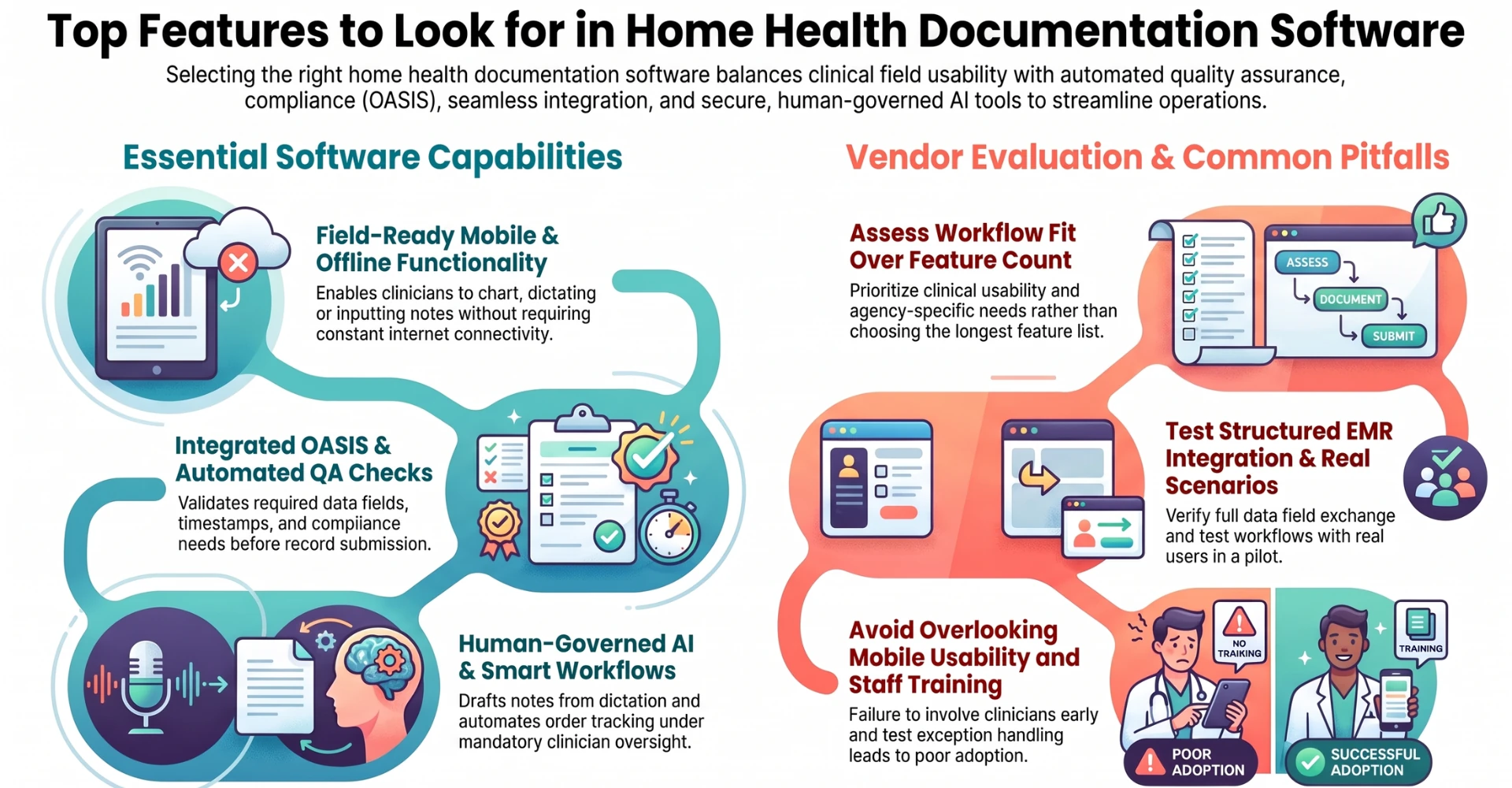
Not every agency needs every feature at the same level. The best choice depends on the agency's patient population, payer mix, existing technology, clinical workflows, and operational priorities.
What Clinical Documentation Features Should Home Health Agencies Look For?
Clinical documentation features should make it easier to create complete, individualized records that accurately reflect the patient's condition, the services provided, and the clinician's observations.
Look for software that supports:
- Skilled nursing and therapy visit notes.
- Initial and follow-up assessments.
- Medication reconciliation and relevant medication documentation.
- Care plans and order management.
- Patient goals, interventions, and progress.
- Wound documentation, including measurements and images where appropriate.
- Vital signs and relevant clinical observations.
- Patient and caregiver education.
- Signatures, timestamps, and record amendments.
- Documentation review and correction workflows.
Templates should guide clinicians without forcing every patient into the same narrative. A visit involving complex wound care, for example, may require more detailed documentation than a routine follow-up visit.
The software should also make it clear which information is required, which is optional, and which entries need additional review.
Why Is OASIS Support an Important Feature in Home Health Documentation Software?
OASIS support is essential for agencies that complete applicable OASIS assessments. The software should support the relevant assessment workflows, validation rules, data fields, and submission requirements.
As of October 2026, OASIS-E2 has been effective since April 1, 2026. CMS provides the current instruments, guidance manual, and data specifications through its official resources:
When evaluating software, ask whether the vendor updates its assessment workflows and validation logic as CMS requirements change.
Other useful capabilities include assessment completeness checks, support for applicable assessment time points, correction workflows, and appropriate data export or submission capabilities.
OASIS support should help clinicians complete accurate assessments. It should not be treated as a substitute for clinical judgment or proper assessment training.
How Can Documentation Software Help Home Health Agencies Maintain Compliance?
Documentation software can support compliance by helping agencies identify missing information, maintain records, and standardize review processes.
Useful capabilities include:
- Required-field validation.
- Missing signature and authentication alerts.
- Documentation timestamps and amendment histories.
- Role-based access permissions.
- Configurable review and approval workflows.
- Record retention and retrieval capabilities.
- Audit trails showing relevant user activity.
- Alerts for outstanding documentation or orders.
- Updates to applicable assessment and data-submission requirements.
However, software cannot guarantee compliance by itself. Compliance depends on accurate documentation, appropriate clinical practice, staff training, organizational policies, and adherence to applicable federal, state, and payer requirements.
Agencies should evaluate whether the software helps them demonstrate what was documented, who completed or approved it, and when relevant actions occurred.
What Mobile Documentation Features Do Home Health Nurses Need?
Home health clinicians work in patients' homes, where connectivity, workspace, time, and available equipment can vary considerably.
Mobile documentation software should therefore be practical to use in the field.
Look for:
- Mobile-friendly clinical forms.
- Secure access from supported phones and tablets.
- Clear navigation with minimal unnecessary steps.
- Voice input or dictation, where available.
- Access to relevant patient information.
- The ability to capture observations and supporting information.
- Secure handling of photographs and other clinical attachments.
- Offline documentation with reliable synchronization, if supported.
- Clear indicators showing whether records have been saved or synced successfully.
Offline capability deserves particular attention. If a vendor offers it, ask which functions work without connectivity, how conflicts are handled, and how users can confirm that entries have synchronized.
The goal is to help clinicians document accurately without spending unnecessary time navigating the software.
Should Home Health Documentation Software Support Voice Dictation?
Yes, voice dictation can be a valuable option for clinicians who find speaking faster or more convenient than typing.
More advanced AI-assisted tools like Copper AI may also convert spoken information into structured drafts, organize observations into appropriate sections, and help prepare visit documentation.
However, dictation and AI-generated documentation are not the same thing. Basic dictation converts speech into text; AI-assisted documentation may interpret the content and organize it into a draft.
Agencies should assess whether the system handles clinical terminology accurately, preserves the intended meaning, distinguishes relevant details, and allows clinicians to correct errors before finalizing the record.
Voice documentation should be optional and practical for different working environments. Clinicians must also follow appropriate privacy practices when recording or processing patient information.
What EMR Integration Features Should Home Health Documentation Software Have?
Integration is important because home health agencies often use multiple systems for clinical records, referrals, scheduling, billing, electronic visit verification, and communication.
Documentation software should be evaluated for its ability to exchange relevant information with the agency's existing systems.
Ask vendors about:
- Supported EMR and EHR integrations.
- Referral and patient demographic data exchange.
- Care plan and order workflows.
- Scheduling and visit information.
- Document transfer and record synchronization.
- APIs or other supported integration methods.
- Error handling when data transfers fail.
- Duplicate-record prevention.
- Auditability of transferred information.
An integration that only imports a document may not be equivalent to one that transfers structured information into the correct fields.
Agencies should test their actual workflows during implementation rather than relying solely on a vendor's statement that it “integrates with your EMR.”
How Can Automated Documentation Checks Reduce Errors and Rework?
Automated checks can help identify potential documentation issues before a record moves to the next stage of the workflow.
For example, software may flag a missing signature, an incomplete required field, an inconsistent date, or a mismatch between selected information and another part of the record.
More advanced tools may identify potentially contradictory statements or suggest that a reviewer examine an unusual entry.
These checks can reduce avoidable rework, but they should be designed carefully. A warning does not automatically mean the record is incorrect, and a record that passes automated validation is not necessarily clinically complete.
The best systems distinguish between hard errors that prevent a required action, warnings that need review, and suggestions that clinicians can accept or reject.
What Quality Assurance Features Should Home Health Documentation Software Include?
Quality assurance features help agencies review records for completeness, consistency, and alignment with their policies and applicable requirements.
Look for capabilities such as:
- Configurable QA checklists.
- Assignment of records to designated reviewers.
- Identification of missing or incomplete documentation.
- Tracking of physician orders and outstanding signatures.
- Review comments and correction requests.
- Resubmission and approval workflows.
- Status tracking for records awaiting review.
- Reporting on recurring documentation deficiencies.
- Searchable records and audit histories.
A useful QA system should help agencies identify patterns, not just correct individual records.
For example, if reviewers repeatedly find missing information in a particular documentation section, the agency can investigate whether the issue stems from training, workflow design, templates, or system usability.
Can AI-Powered Documentation Software Reduce Manual Work for Home Health Nurses?
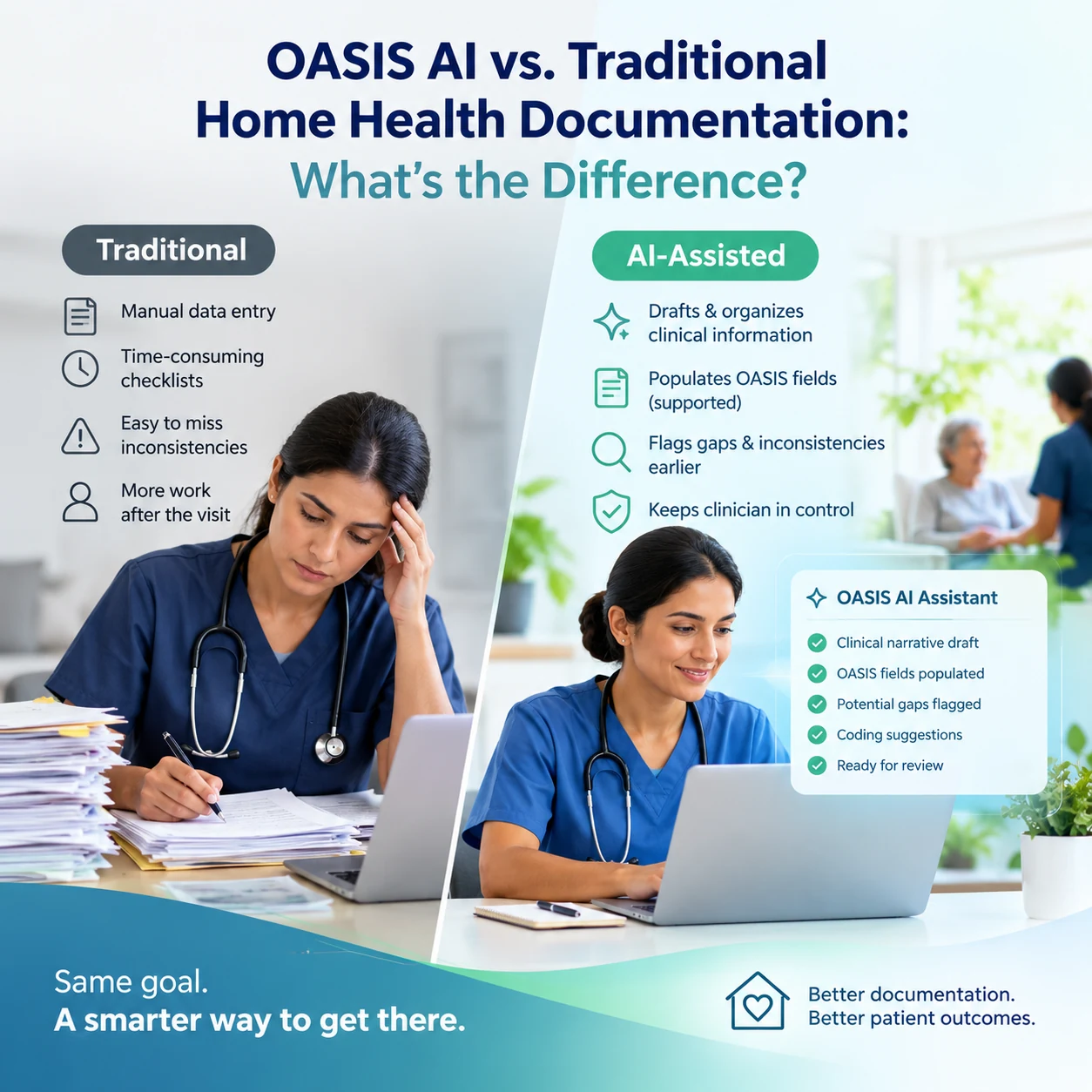
AI can potentially reduce manual work by assisting with transcription, structuring visit notes, extracting relevant information, summarizing records, and identifying potential gaps.
For example, a clinician may provide visit information through voice input. An AI tool can organize that information into a draft, which the clinician then reviews, corrects, and approves.
Depending on the product, AI may also assist with referral processing, documentation quality checks, or information retrieval.
Agencies should ask vendors to demonstrate the exact tasks their AI performs and identify which steps still require staff intervention.
AI-generated content should be checked for accuracy, completeness, context, and unsupported statements. Clinical decisions and final documentation approval should remain with appropriately authorized professionals.
The value of AI should be measured by actual time saved, reduced rework, usability, and documentation quality, not simply by the presence of an AI feature.
What AI Safety and Human Review Features Should Agencies Look For?
AI features should operate within clear permissions and review processes.
Important capabilities include:
- Clinician review and approval of AI-generated drafts.
- Easy correction of inaccurate or incomplete content.
- Clear identification of AI-generated or AI-modified material where appropriate.
- Audit trails for relevant actions.
- Access controls for patient information.
- Escalation workflows for uncertain or exceptional cases.
- Monitoring and evaluation of AI performance.
- Controls over what an AI tool can change, send, or finalize.
Agencies should be especially careful about claims that AI can independently complete clinical assessments, finalize records, or make clinical decisions without appropriate oversight.
The objective is to reduce administrative burden while preserving clinical accountability.
What Security Features Should Home Health Documentation Software Provide?
Because home health documentation may contain protected health information (PHI), security should be a core evaluation criterion.
Agencies should assess:
- Encryption of data in transit and at rest.
- Role-based access controls.
- Multi-factor authentication, where appropriate.
- Audit logging and activity monitoring.
- Secure backups and recovery procedures.
- Device and session security.
- Data retention and deletion policies.
- Vendor access controls.
- Incident response and breach notification processes.
- Appropriate contractual safeguards, including a business associate agreement when required.
For AI-enabled products, agencies should also understand whether patient data is sent to third-party model providers, how it is retained, and whether it may be used for model training.
Security claims should be verified through appropriate documentation and due diligence. No single certification or security feature guarantees that a product is suitable for every agency's environment.
How Can Workflow Automation Improve Home Health Documentation?
Workflow automation can help move records and tasks through the agency without relying on staff to remember every next step.
Examples include reminders for incomplete notes, routing documents for review, tracking unsigned orders, assigning correction requests, and notifying staff about outstanding tasks.
More advanced workflows may connect referral intake, documentation, QA, and billing preparation so that information does not have to be manually re-entered at every stage.
Agencies should evaluate whether automation is configurable, whether staff can see the status of outstanding work, and how exceptions are handled.
Automation should make responsibilities clearer and reduce unnecessary follow-up, not create a larger queue of alerts that staff must manage.
What Reporting and Analytics Features Are Useful in Home Health Documentation Software?
Reporting and analytics help agency leaders understand where documentation workflows are working and where they are breaking down.
Useful metrics may include:
- Time from visit completion to note completion.
- Percentage of notes completed within agency-defined timeframes.
- Missing signatures and outstanding orders.
- QA rejection and correction rates.
- Average time records spend awaiting review.
- Recurring documentation deficiencies.
- Referral processing and documentation turnaround times.
- AI draft acceptance and correction rates, where applicable.
Reports should be filterable by relevant teams, locations, workflow stages, and time periods while respecting access permissions.
Metrics should be interpreted in context. For example, faster note completion is not a positive result if documentation quality declines.
How Should Home Health Documentation Software Support Physician Orders and Care Plans?
Documentation software should help agencies create, track, review, and maintain the records associated with care plans and physician or other authorized practitioner orders, as applicable.
Depending on the agency's workflow and the platform, useful capabilities may include:
- Tracking outstanding orders and signatures.
- Linking orders to the relevant patient and care episode.
- Recording order status and follow-up activity.
- Maintaining an appropriate history of revisions.
- Alerting staff to unresolved items.
- Helping reviewers compare documentation against the relevant plan of care.
The system should make it easier to identify unresolved items without implying that a software alert alone determines whether an order or service meets applicable requirements.
Agencies should confirm that the workflow aligns with current regulations, payer rules, and organizational policies.
What Should Agencies Look for in Software Implementation and Training?
Even feature-rich software can fail if clinicians and administrative staff cannot use it effectively.
Before choosing a platform, ask what implementation support the vendor provides.
Evaluate:
- Data migration and configuration support.
- Workflow mapping before launch.
- Role-specific training for clinicians, QA reviewers, and administrators.
- Training environments and practice scenarios.
- Support for mobile-device setup.
- Integration testing.
- Help desk availability and escalation processes.
- Training for future software and regulatory updates.
- Adoption reporting and post-launch optimization.
A practical demonstration should include a realistic end-to-end workflow, not just a polished product tour.
For example, ask the vendor to show how a clinician creates a note, how the note is reviewed, how a correction is handled, and how the completed record moves into the agency's downstream workflow.
How Can Home Health Agencies Compare Documentation Software Vendors?
Agencies should compare vendors against a consistent set of requirements rather than choosing based on the longest feature list.
A practical scorecard can help:
| Evaluation Area | What to Verify |
|---|---|
| Clinical fit | Supports the agency's disciplines, assessments, and documentation needs |
| OASIS readiness | Supports current applicable assessment requirements and updates |
| Mobile usability | Works reliably in the agency's actual field conditions |
| Integration | Exchanges the necessary data with existing systems |
| QA and compliance | Supports review, validation, signatures, and auditability |
| AI capabilities | Demonstrates specific tasks, limitations, and human-review controls |
| Security | Meets the agency's security, privacy, and contractual requirements |
| Reporting | Provides actionable workflow and quality metrics |
| Implementation | Includes realistic training, migration, and support |
| Total cost | Includes licensing, implementation, integrations, devices, and ongoing support |
Where possible, run a pilot with representative users and real-world scenarios using appropriately protected or de-identified data.
The best software is the one that performs well in the agency's actual environment, not necessarily the one with the most features.
How Much Does Home Health Documentation Software Cost?
The cost varies by vendor, agency size, functionality, licensing model, and implementation requirements.
Some platforms charge per user, while others use per-patient, per-visit, agency-level, or bundled pricing. Additional costs may apply for integrations, data migration, training, premium support, AI usage, or specialized modules.
When comparing quotes, agencies should calculate the total cost of ownership, not just the monthly subscription.
They should also consider measurable operational benefits, such as reduced documentation time, less rework, fewer manual follow-ups, and improved workflow visibility. These benefits should be validated during a pilot rather than assumed.
What Are the Most Common Mistakes Agencies Make When Choosing Documentation Software?
Several common mistakes can lead to poor adoption or unexpected costs:
- Choosing based on feature count instead of workflow fit.
- Overlooking mobile usability.
- Assuming an integration supports every required workflow.
- Treating automated validation as proof of compliance.
- Accepting AI accuracy claims without testing them.
- Underestimating implementation and training requirements.
- Ignoring data migration and contract terms.
- Failing to test exception handling.
- Measuring speed without measuring quality.
- Not involving clinicians and QA staff in the selection process.
A stronger approach is to define the agency's main documentation problems first, identify the features needed to address them, and test those features against realistic scenarios.
What Is the Best Home Health Documentation Software for an Agency?
There is no single best platform for every home health agency.
A small agency may prioritize ease of use, mobile documentation, and affordability. A larger organization may place greater emphasis on integration, reporting, multi-location workflows, centralized QA, and automation.
Agencies should begin by identifying their biggest operational challenges:
- Are nurses spending too much time completing notes?
- Are records frequently returned for corrections?
- Are orders and signatures difficult to track?
- Is referral information entered manually?
- Are clinicians working across disconnected systems?
- Is the agency struggling to keep software aligned with changing requirements?
The best choice is the platform that addresses the agency's most important problems while meeting its clinical, security, integration, and compliance needs.
How Can Home Health Documentation Software Help Clinicians Spend More Time on Patient Care?
Documentation software can support patient care when it removes unnecessary administrative steps without compromising record quality.
That means reducing duplicate entry, making relevant patient information easier to access, simplifying documentation, identifying missing information earlier, and coordinating follow-up tasks more efficiently.
AI can contribute by drafting documentation, organizing information, and supporting selected workflows. Mobile tools and integrations can reduce the need to repeat work across applications.
The goal should not be to eliminate documentation. Accurate documentation remains essential to continuity of care, clinical communication, and agency operations.
The goal is to make documentation more accurate, more efficient, and less burdensome, so clinicians can focus more of their time and attention on patients.